Review Your Entries
Ask What Is Already Logged
What have I logged this week?
Tolmete Connectors · MCP
Connect Tolmete to Claude Desktop, Cursor, Codex, or any MCP-compatible client. Tell your agent what you worked on, and it can create, review, and correct your Tolmete time entries — without opening another timesheet.
Works With
Any MCP-Compatible Client
The Problem
Tolmete makes project management through chat feel natural for contributors and managers. You describe what you did or what you need; the AI workflow assistant for teams handles the structure, fields, and formatting in the background.
Developers and designers already spend their day inside editors, terminals, and AI agents. But logging time usually means leaving that environment, opening another tool, finding the right project, remembering what happened earlier, and filling in a form.
A debugging session with a specific cause, investigation, and outcome can become nothing more than “bug fixing” by the time the timesheet gets filled in.
Logging Monday's work on Friday means relying on memory. The result may look reasonable, but the detail behind the work is already gone.
The AI agent is already part of the contributor's working environment. Traditional time tracking still lives somewhere else.
Tolmete Connectors close that gap.
Product Demo
If you're looking for "a better timesheet," Tolmete is probably not what you actually need. Time trackers focus on control. Tolmete focuses on understanding.
Ask What Is Already Logged
What have I logged this week?
Change it in the same conversation
Make the checkout refactor 4 hours instead of 5.
One message, several entries
Log yesterday: 4h on the API integration and 2h on design review.
Days off go through the same flow
Log Friday as a day off.
You keep talking to the AI agent already on your screen. Tolmete receives the data through the same projects and permissions used by your Tolmete account.
How It Works
The connector gives your AI agent a defined set of Tolmete actions while keeping those actions within your existing permissions.
Give the connection a label and choose its expiration period. The token secret is shown when it is generated.
Profile Settings → Connectors → Generate Token
Tolmete gives you the configuration snippet needed by your AI client. Copy it into Claude Desktop, Cursor, Codex, or another MCP-compatible client.
Step-by-step integration guides are available for supported clients.
No separate timesheet form is required during the interaction.
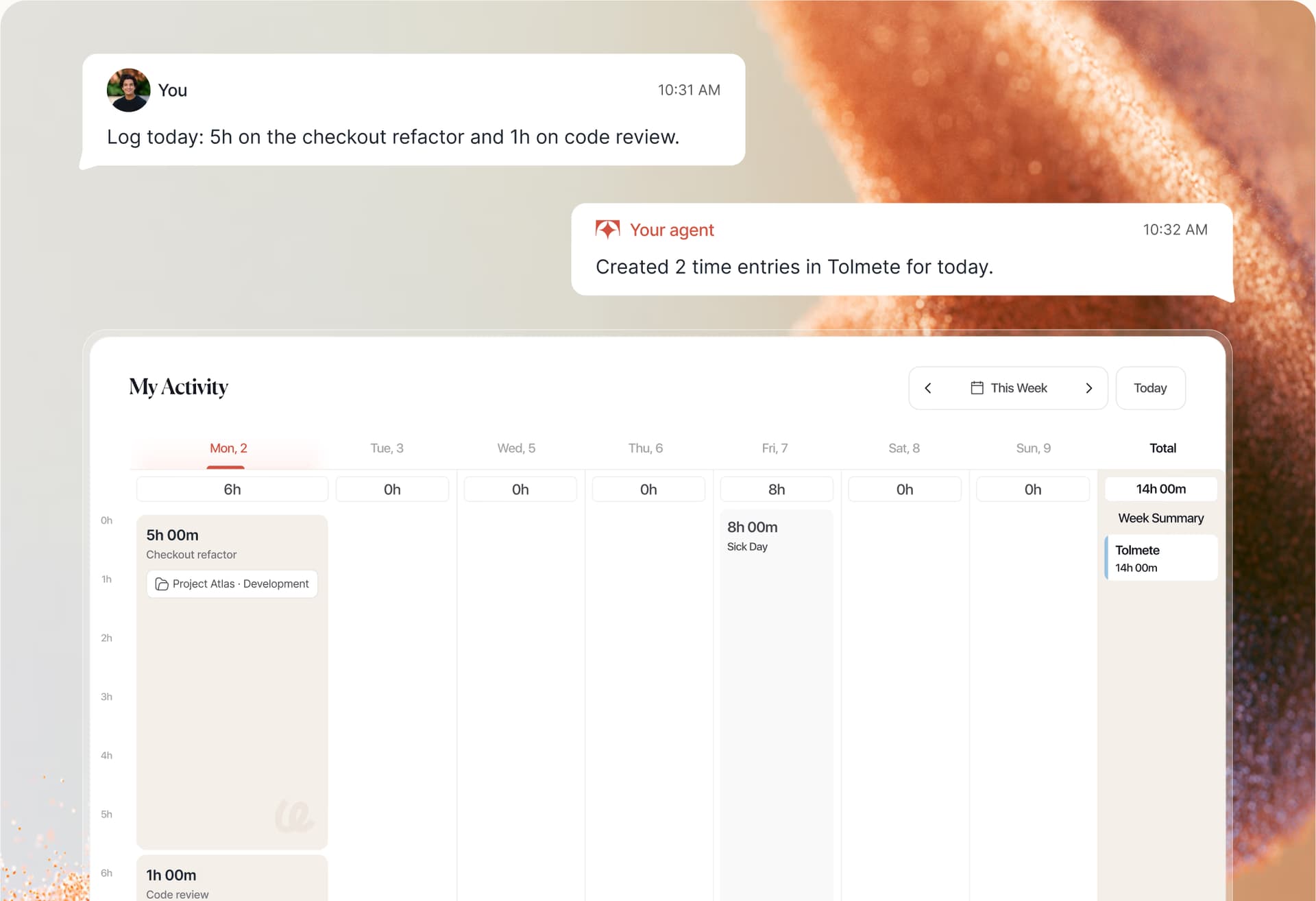
Example: Log 3 hours on the payments refactor and 1 hour on code review today.
The resulting entries appear as normal Tolmete time logs associated with your projects. They remain available in the Tolmete interface, reports, and connected workflows.
{
  "mcpServers": {
    "tolmete": {
      "url": "https://…/api/mcp",
      "headers": {
        "Authorization": "Bearer tlm_mcp_…"
      }
    }
  }
}
Capabilities
The connector gives your AI agent a defined set of Tolmete actions while keeping those actions within your existing permissions.
Your agent can look up projects available to you so entries can be assigned to the appropriate Tolmete project without manually copying project IDs.
A single message can contain multiple activities.
Log yesterday: 4h on the API and 2h on design review.
Ask what has already been recorded before adding new entries.
What did I log yesterday?
Change the duration, project, or description conversationally.
Change the API entry from 4 hours to 3.5.
Your agent can remove your own entries when necessary.
Destructive actions are marked accordingly so compatible AI clients can treat them as destructive operations.
Days off and absences can go through the same connector and into Tolmete's existing absence flow.
See how Tolmete Connectors let your team log, review, and correct time directly from the AI agents they already use — while keeping everything inside the same Tolmete projects, permissions, and reporting workflows.
Works With
Any MCP-Compatible Client
Core Value
When logging time takes one short interaction in a tool that is already open, contributors have fewer reasons to postpone it. That improves the quality of the data that reaches the rest of the business.
Log work while the details are still fresh instead of reconstructing the week from memory.
Entries can retain meaningful information about what actually happened instead of collapsing into generic categories.
Developers and designers continue working in the AI tools they already use. Time logging becomes another action inside that workflow.
How Intelligent Risk Alerting Works
A scope change on a time-and-materials project is routine. The same change on a fixed-price project near a deadline is a crisis. This is where AI project risk detection becomes useful: Tolmete evaluates sprint timing, billing models, and team capacity so managers only see alerts that actually require attention.
Developers & Designers
Time tracking should not be the administrative task that pulls you away from your editor or AI workflow.
Tell the agent already on your screen what should be logged, and the resulting entries appear in Tolmete.
Log yesterday: 4h on the API and 2h on design review.
Project Managers
When contributors can log work with less friction, project data can arrive sooner and with more useful descriptions.
That gives PMs a more current view of project activity without relying entirely on end-of-week reminders.
Agency Leaders
Utilisation, project profitability, reporting, and invoicing all depend on the quality of the underlying time data.
Making time logging easier for contributors improves the inputs those downstream processes depend on.
Product ecosystem
Tolmete Connectors are not a separate time tracking system.
They provide another way to create and manage data inside Tolmete's existing workflows.
Entries created through an AI agent are ordinary Tolmete time logs. They use the same projects and appear alongside entries created through the Tolmete interface.
Time logged through an AI agent can continue through the same invoicing workflows as other Tolmete time entries.
Absences created through the connector enter Tolmete's existing absence management workflow.
Comparison
Traditional client reporting depends on someone finding the time to build it. Tolmete replaces that cycle with a client reporting system that uses delivery evidence and automatically keeps clients informed.
Without Tolmete
With Tolmete
Traditional time tracking asks contributors to go to the tracker. Tolmete brings time logging into the AI workflow where work is already happening.
Security & Permissions
Connecting an AI client does not create a separate permission model inside Tolmete. Actions performed through the connector run with the permissions of the person who created the token.
Each connector token belongs to the individual Tolmete account that created it.
Choose an expiration period when creating your connection.
What you cannot access in Tolmete, your agent cannot access through the connector either.
A connector token can be revoked from Tolmete when the connection is no longer needed.
Tolmete provides information about connector usage so users can review their connections.
Connect Tolmete to the AI agent you already work with and turn time logging into a conversation instead of another administrative task.
Works With
Any MCP-Compatible Client
FAQ
Everything you need to know about Tolmete.