AI Chat Interface

The AI chat that turns routine workinto conversation

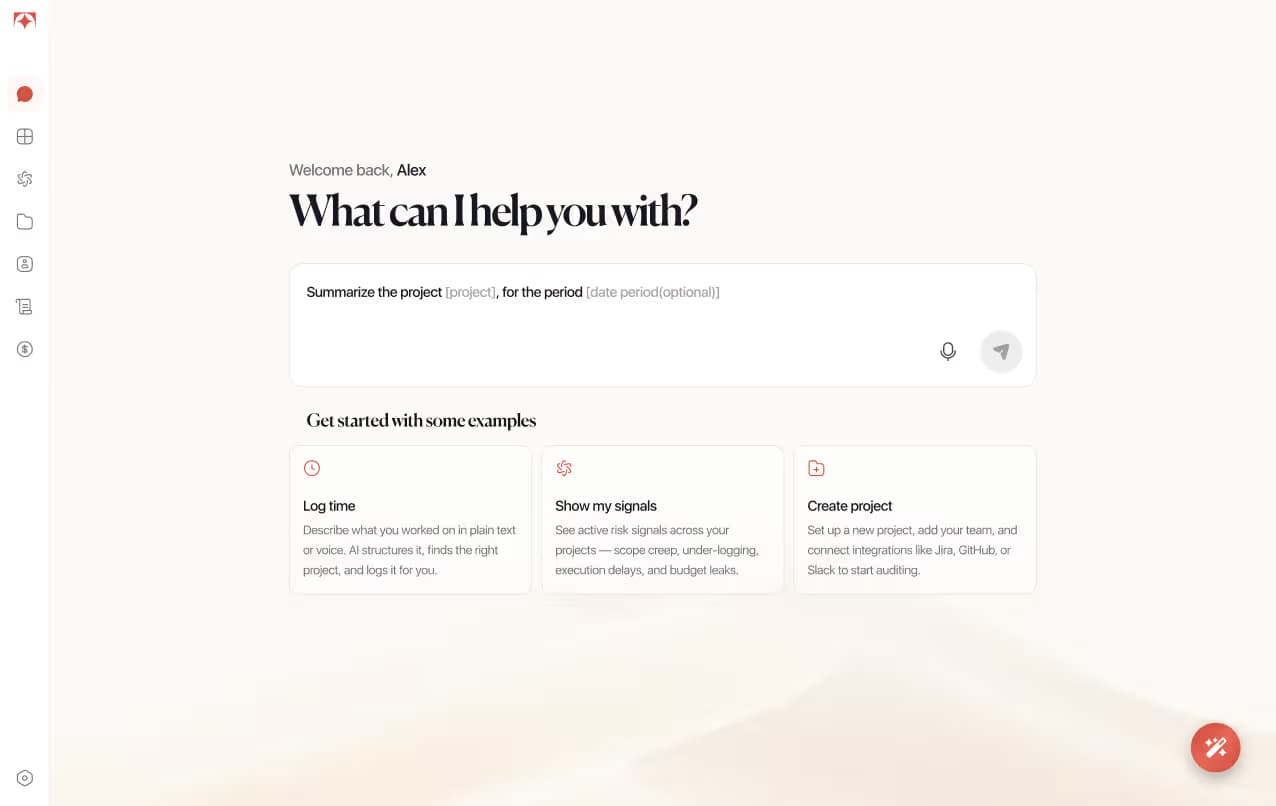
Tolmete turns scattered updates into a clear, operational project summary you can actually use. It reads the real work happening in your tools, structures what matters, and surfaces progress, bottlenecks, and next-step insights in seconds.

See It in Action
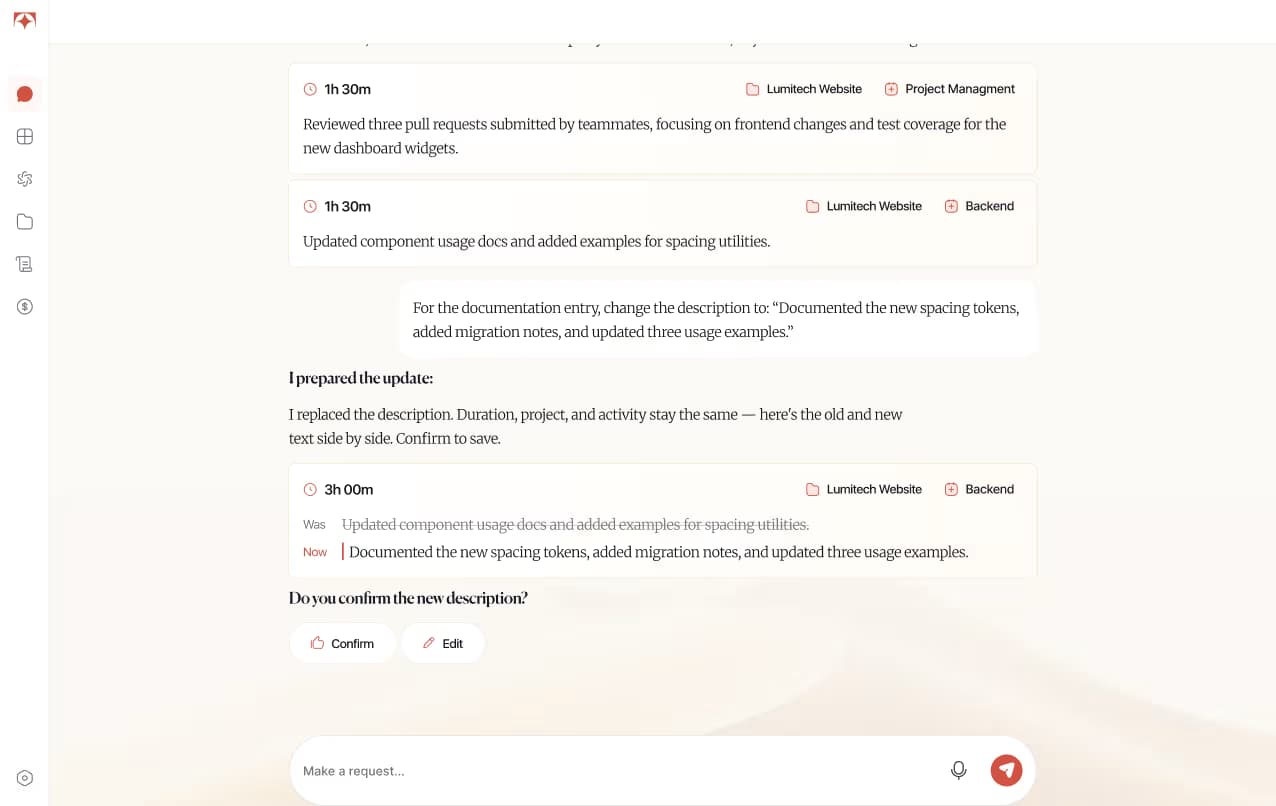
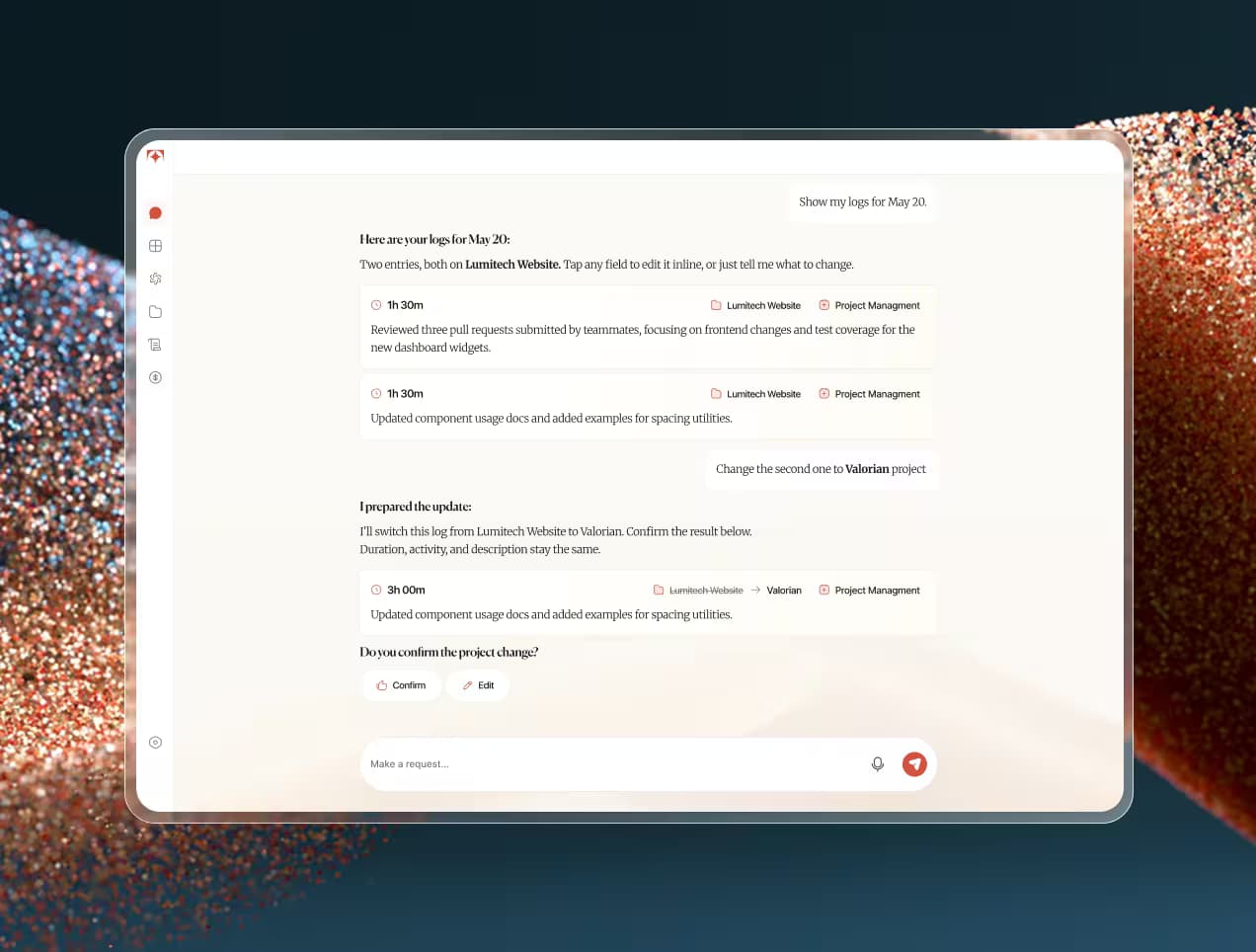
Tolmete AI chat interface preview — reviewing and editing time logs through conversation

The Problem

When Project Tools Feel Like Extra Work

Most tools turn simple actions like logging time, updating projects, inviting people, or checking status into forms, dropdowns, and long navigation, which causes context switching and delays.

Tolmete replaces this friction with chat-based project management: you just type what happened or what you need. Its AI assistant turns that into clean, structured actions for the team.

  • Too much effort for simple actions

    Adding a short time entry or changing a project detail often takes multiple screens, fields, and buttons. As a result, team members postpone updates or skip them completely because the system feels heavier than the actual task.


  • Delayed and low-quality updates

    When tools are painful, time logs are written at the end of the week and project fields stay outdated. Managers lose real-time visibility, and decisions rely on guesses instead of current project reality.

  • PMs becoming tool operators

    Project managers spend more time navigating interfaces than managing delivery. They become admins of several systems instead of leaders of conversation-based project operations, just to keep everything in sync.

See It in Motion

One AI Assistant for the Work Your Team Does Every Day

The AI assistant is the heart of Tolmete. It gives every person an AI chat assistant for project management that completes routine workflows from a single chat window, turning natural language into structured actions you can trust.

From chat to action in seconds

See how Tolmete helps teams move work forward without switching tools

How it works

How Chat-Based Project Management Works in Tolmete

Tolmete makes project management through chat feel natural for contributors and managers. You describe what you did or what you need; the AI workflow assistant for teams handles the structure, fields, and formatting in the background.

01.

Type or dictate a request

You start with a simple message or voice note: what you worked on, what needs to change, or what you want to know. There is no need to remember where that setting lives or which form to open.

02.

Tolmete understands the context

The assistant identifies projects, tasks, people, and activity types from your message. Using connected tools and previous history, the project management chat assistant links your request to the right place in your workflow without you specifying every detail.

03.

The system prepares a structured result

Instead of saving raw text, Tolmete builds a structured time entry, project action, or AI-driven project summary. It adds tags, connects evidence, and prepares the result like a human assistant who knows your process.

04.

Confirm and keep moving

You quickly check what Tolmete prepared, make edits if necessary, and confirm. Then you go back to your work. No interruption, no long forms, and no jumping between modules.

What Teams can do with a Chat

What Teams can Actually Do with
the AI Assistant

Use the AI Chat Assistant to complete everyday work faster across time tracking, project updates, team actions, and summaries.

Tolmete AI chat — log time by describing completed work in a conversation

Log time

Describe what you just completed in one sentence, and Tolmete instantly turns it into a structured time entry with project, activity, and duration attached. You don’t have to touch any form fields; the AI chat for routine project work does the admin part for you.

Tolmete AI chat — refine a time entry with a follow-up message

Refine entries

If something is not perfect, you can adjust it by simply writing a follow-up message. Change the project, tweak the duration, or add more context directly in chat before saving, so logs stay clean without the feeling of doing double work.

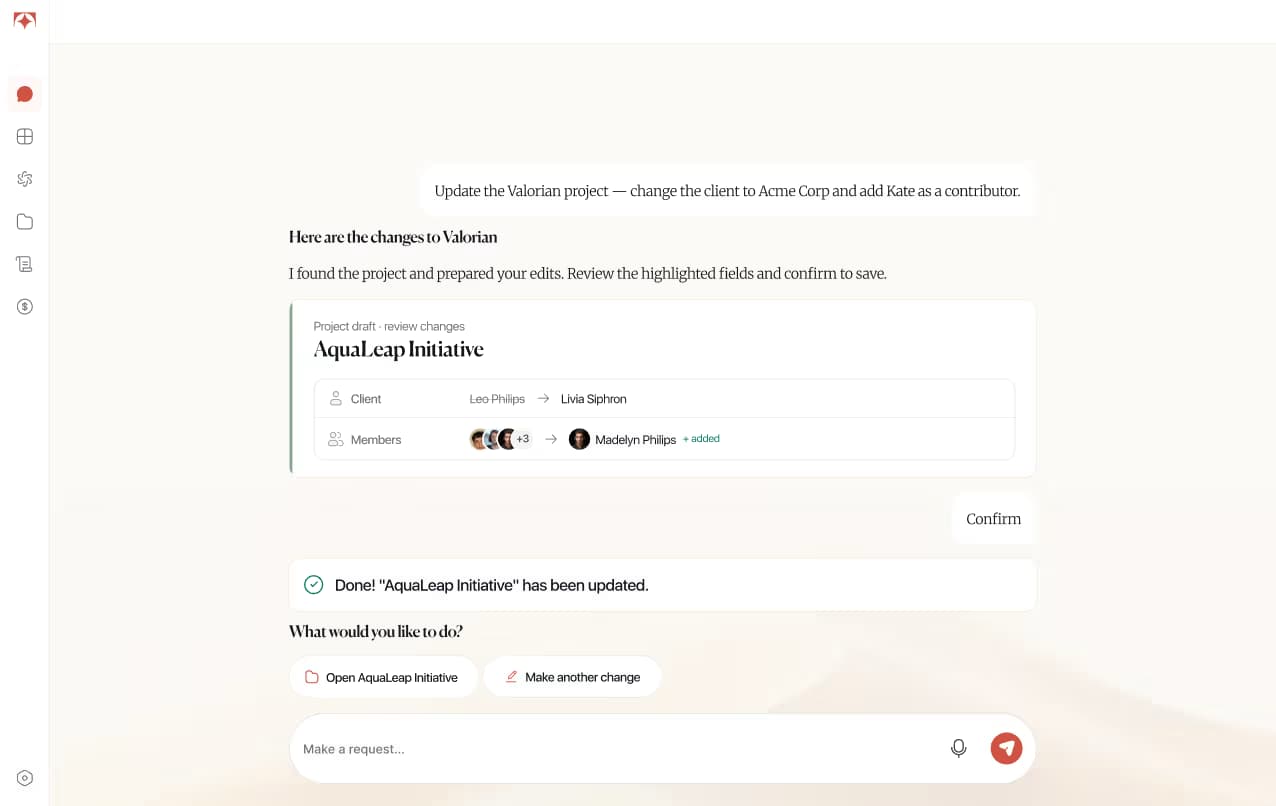
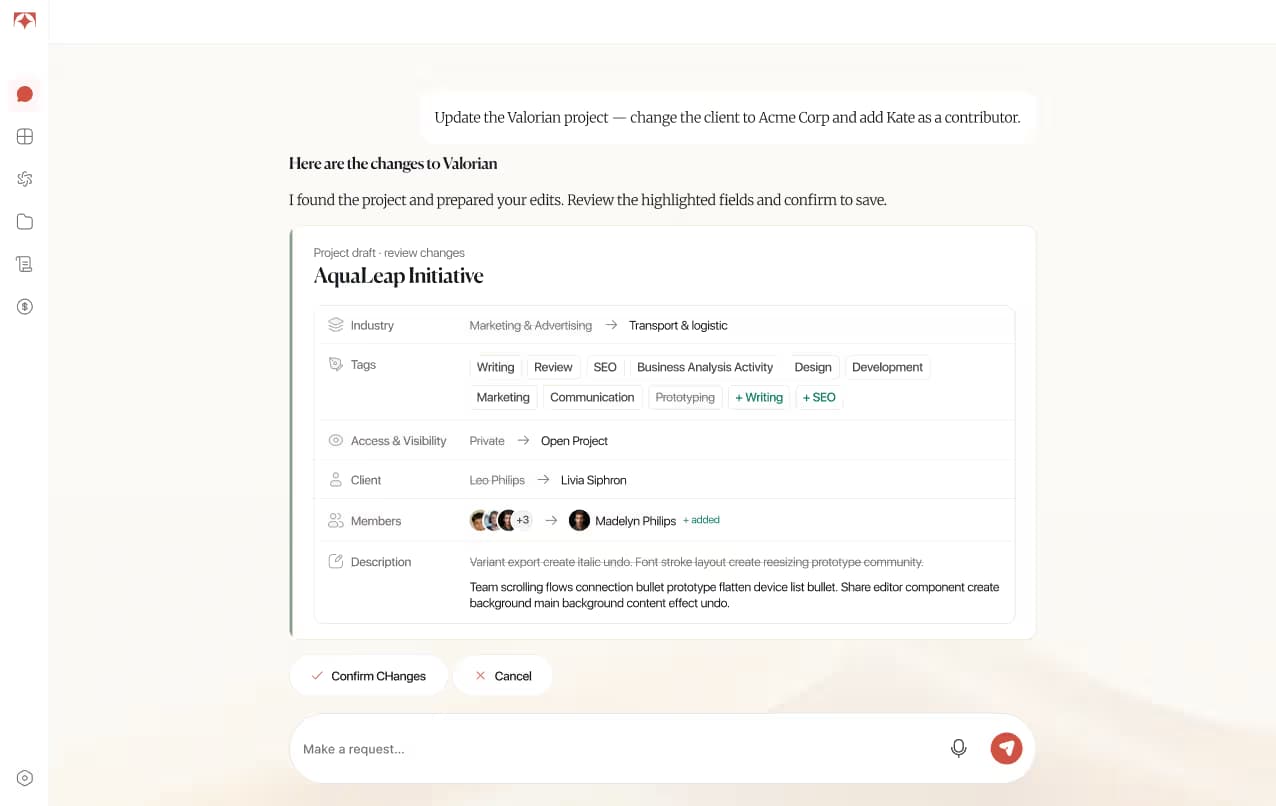
Tolmete AI chat — run project actions such as creating a project or assigning a task

Run project actions

Need to create a project, add someone to the team, or assign a task? Just ask. Tolmete lets you manage projects through chat, so you don’t waste time searching through settings or configuration pages to perform common project actions.

Tolmete AI chat — get an instant AI-generated project summary

Get instant summaries

Ask the assistant for a real-time overview of a project: progress, recent activity, and potential blockers. Instead of reading through long reports or Slack threads, you get an AI-generated project summary that is ready to share with stakeholders.

The Solution

Built for both contributors
and project managers

Time tracking without friction

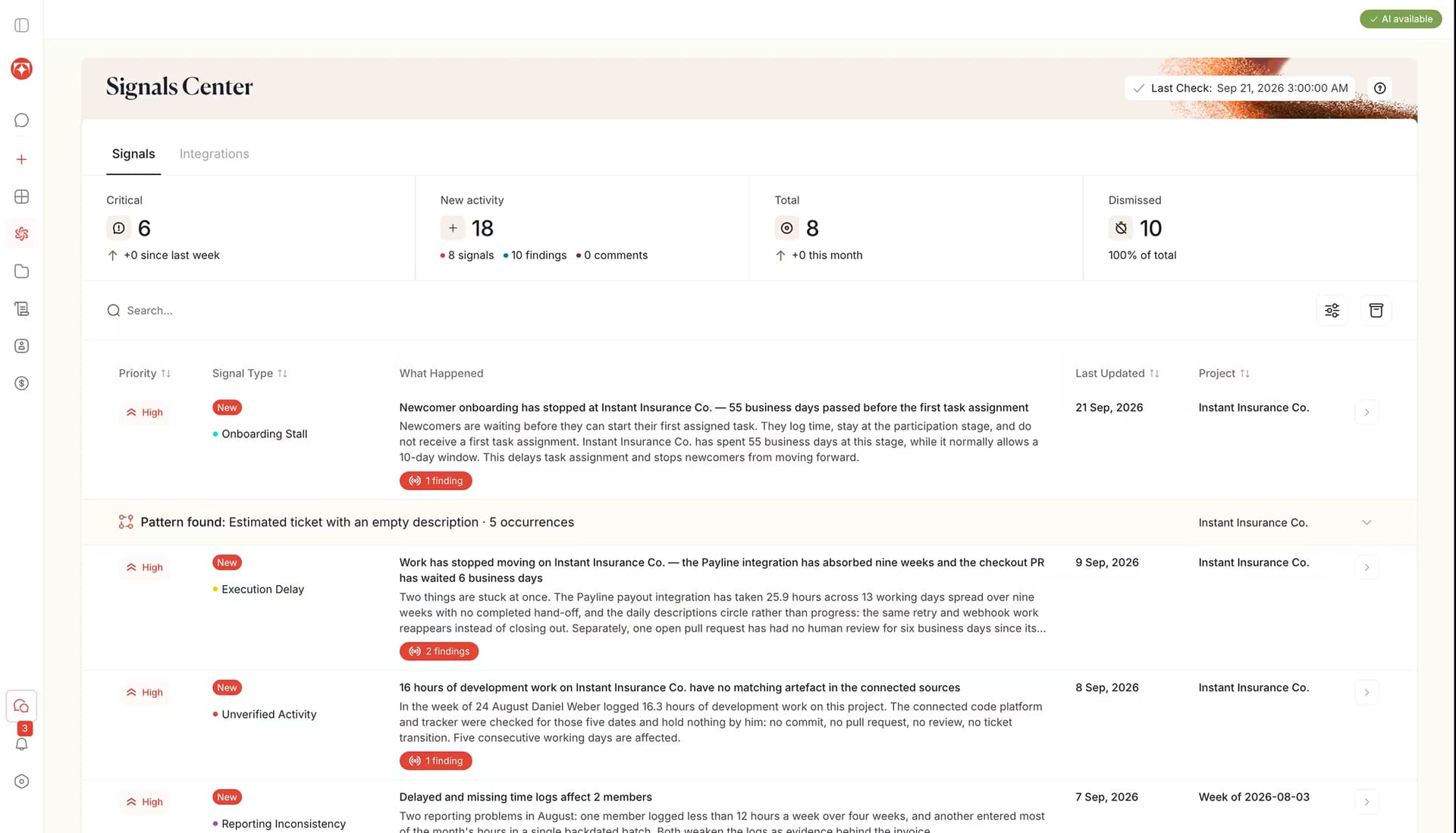
Tolmete helps project managers get to the real status faster, but the effect is wider than just time savings. Because updates are analyzed, structured, and prioritized automatically, everyone sees the same clear picture.

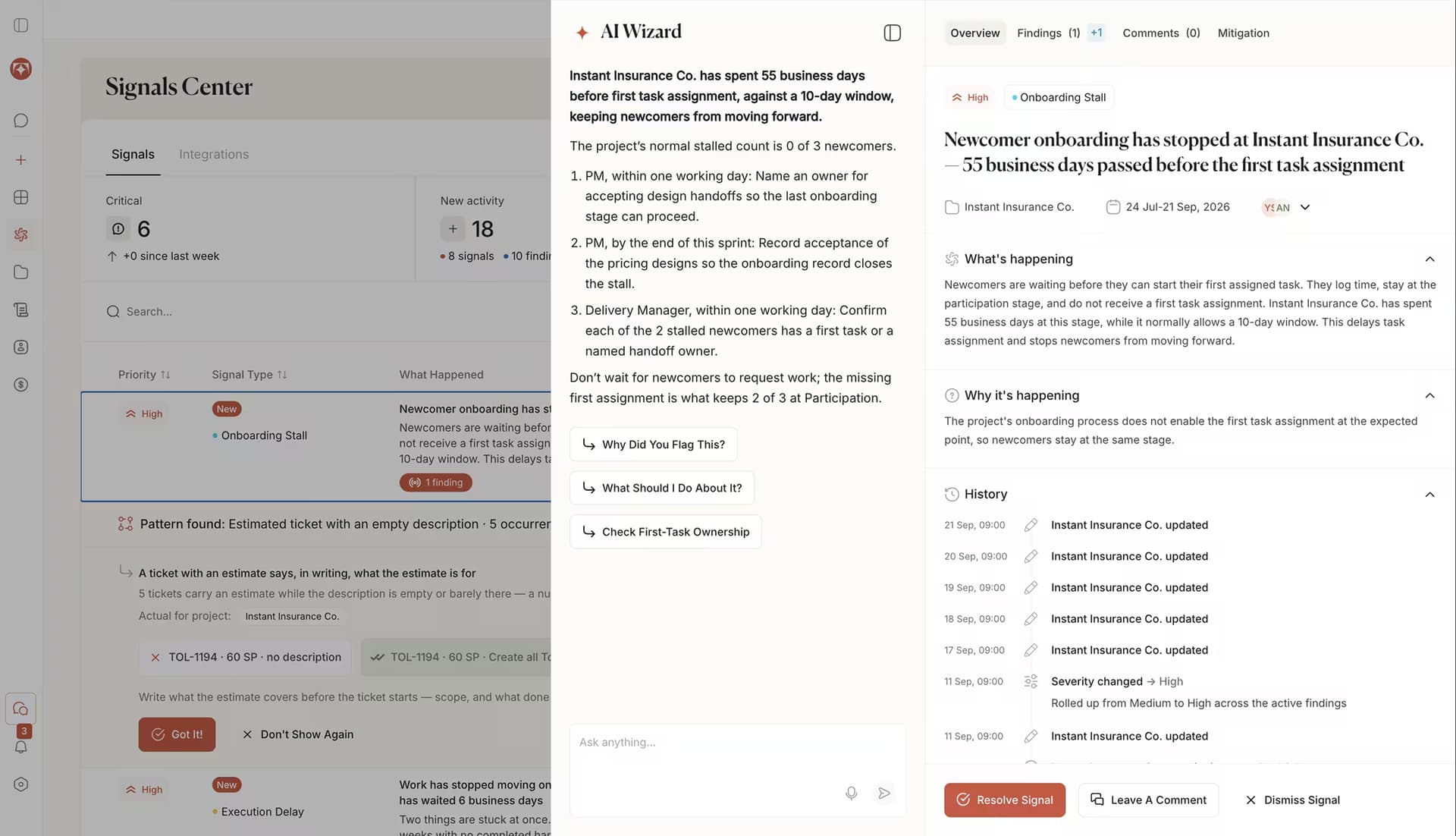
Behind the scenes, the AI project report generator looks at timelines, rework, stagnation, and scope changes to power project bottleneck detection. You see where to lean in before the issue becomes visible in revenue.

Project ViewContributor
Project Viewthe PM
Tolmete PM project view — signals center and delivery overview
Tolmete contributor chat view — logging work through conversation

Faster logging

Better proof of work

Fewer corrections

Chat Over Forms

Explore AI-powered Workflows
in Tolmete

Tolmete makes project management through chat feel natural for contributors and managers. You describe what you did or what you need; the AI workflow assistant for teams handles the structure, fields, and formatting in the background.

AI Time Logging

Track work by simply describing what you did in your own words. Tolmete interprets your message, structures the entry with project and activity details, and lets you refine it through conversational commands before saving.

AI Project Summary

Ask Tolmete to explain what is going on in a project without digging into dashboards. You get a concise overview of progress, bottlenecks, and key activities that you can use in standups, status emails, or client calls.

Voice time tracking software

Dictate updates on the go, and Tolmete converts them into structured logs behind the scenes. You keep your hands and mind on the real work, while AI workflow management through chat keeps your reporting accurate.

Why choose Tolmete

Why Tolmete's AI assistant outperforms form-based tools

Traditional Tools

  • Forms first
  • Fields first
  • No connection between scope, time, and code
  • Alerts without mitigation guidance

Tolmete AI Chat Assistant

  • Evidence pulled from the tools teams already use
  • Early signals while there is still room to adjust
  • Risk root cause connected to specific evidence
  • A named mitigation plan, not a notification

Instead of pushing you through forms, Tolmete offers AI chat software for project teams that supports project execution through chat and conversational work management.
The result: less time fighting UI, more time actually managing delivery.

Ready to turn admin
into conversation?

Give your team an AI chat assistant for project management that feels like a helper, not another system to babysit. See how you can manage projects through chat and reduce routine overhead in a single week.

FAQ

Frequently Asked Questions

Everything you need to know about Tolmete.

The assistant is built for everyone involved in delivery: contributors who log work, project managers who coordinate, and leads who need quick project views. It acts as an AI assistant for team management and as an AI assistant for project management at the same time, so both sides of the project benefit from the same chat-based experience.
The assistant doesn't invent hours, but it can turn your short messages or voice notes into complete entries. You describe what you did; the AI chat assistant for teams fills in project, duration, and tags. Over time, it learns typical patterns in your AI task management and suggests even faster inputs.
Yes. Every draft is editable via chat: you can change the project, adjust the time, or add detail with follow-up commands. The idea is to keep everything inside project management through chat, so you do not have to move back into traditional forms to fix small things.
Absolutely. PMs can use the project management chat assistant to create projects, invite people, assign work, and request summaries or risk views. Common operations become simple prompts, which turns conversation-based project operations into a practical way to run day-to-day delivery.
Yes. The AI chat assistant for project management can generate project summaries on demand, using your latest signals, logs, and activity. This makes AI chat for routine project work ideal for quick updates before a client call, internal review, or weekly planning session.