

Form fatigue
Logging hours takes more effort than the work itself, so details get dropped and records suffer.
AI Time Logging
AI time logging by Tolmete turns work descriptions into structured records in seconds. A simple chat message replaces manual entry, and Tolmete prepares a draft for review while teams stay focused on delivery.
12 Days
before the problem is visible in a status report
10
risk patterns monitored across every active project
$1
plan, not a notification, for every validated signal
The Problem
Most logging tools rely on rigid dropdowns, calendars, and manual forms. Instead of helping teams record progress, they add bureaucracy to the workday. Contributors log less detail, and managers spend hours correcting weak records. Tolmete removes that friction by turning time tracking into a guided conversational workflow.
Logging hours takes more effort than the work itself, so details get dropped and records suffer.
Inaccurate entries force managers to repeatedly follow up — eating into delivery time.
Standard timesheets fail to capture the real context of the work behind every hour.
Solution
Tolmete converts plain language descriptions into structured logs instantly. The AI work log generator provides teams with a clearer, more consistent way to capture work and maintain accurate project records.
Drift detected
Patterns that put timeline, budget, quality, or trust at risk.
Briefing out
What changed, why it matters, what action reduces the risk.
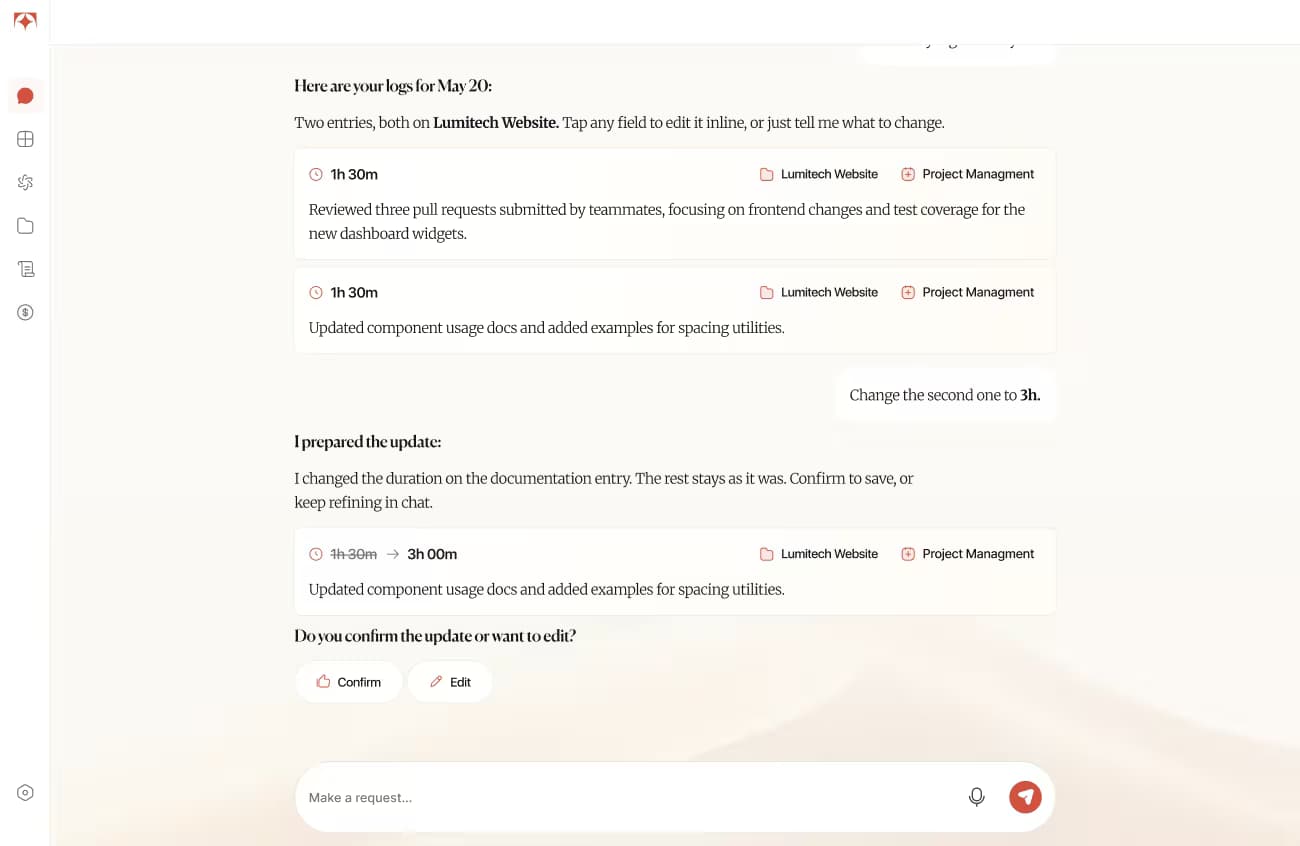
Describe what you worked on in your own words, and Tolmete will turn it into clear, editable time logs with project, activity and context already organized
How it Works
The user sends a brief chat message about the completed task.
The system identifies the project, activity, and duration from the input.
Tolmete prepares a structured record for approval before finalizing.
The user verifies the log, and the system commits it to the timesheet.
The Flexibility
Message Example:
“Change the project to Tolmete and add 30 mins.”
Tolmete uses the existing input as context, applies the new instruction, and returns a revised version for final review.
Most alert systems confirm a problem exists. Tolmete reaches managers with the evidence, context, and next step before the problem becomes visible.
Proactive Guidance
When details are vague or data is invalid, Tolmete responds with precise guidance and examples so teams can move forward without breaking the workflow.
Tolmete identifies incomplete logs and provides examples to ensure high data quality.
The system detects restricted projects and explains how to gain permission.
Tolmete blocks errors such as negative hours and ensures the correct format.
AI time tracking becomes easier to trust when entries are clearer from the start. PMs spend less time cleaning up records, and reporting stays more consistent.
The evidence that protects client relationships
Tolmete helps contributors log time faster, but that is only one part of its value. Beyond AI time logging, the system improves record quality and provides teams with a more reliable view of how work flows across projects.
Less micromanagement
Fewer corrections
Clearer operations
Better reporting quality
Stay in the flow of delivery — describe the work and move on.
Spend less time fixing entries and more time managing delivery.
Reliable data flows directly into reporting and forecasting.
See how Tolmete enables time tracking without timesheets, with less manual effort, fewer corrections, and stronger proof of work.
FAQ
Everything you need to know about Tolmete.