
Project Data Stays Fragmented
Hours, members, and activity tags are hard to review together, so every project report takes longer to prepare.
Project Reports
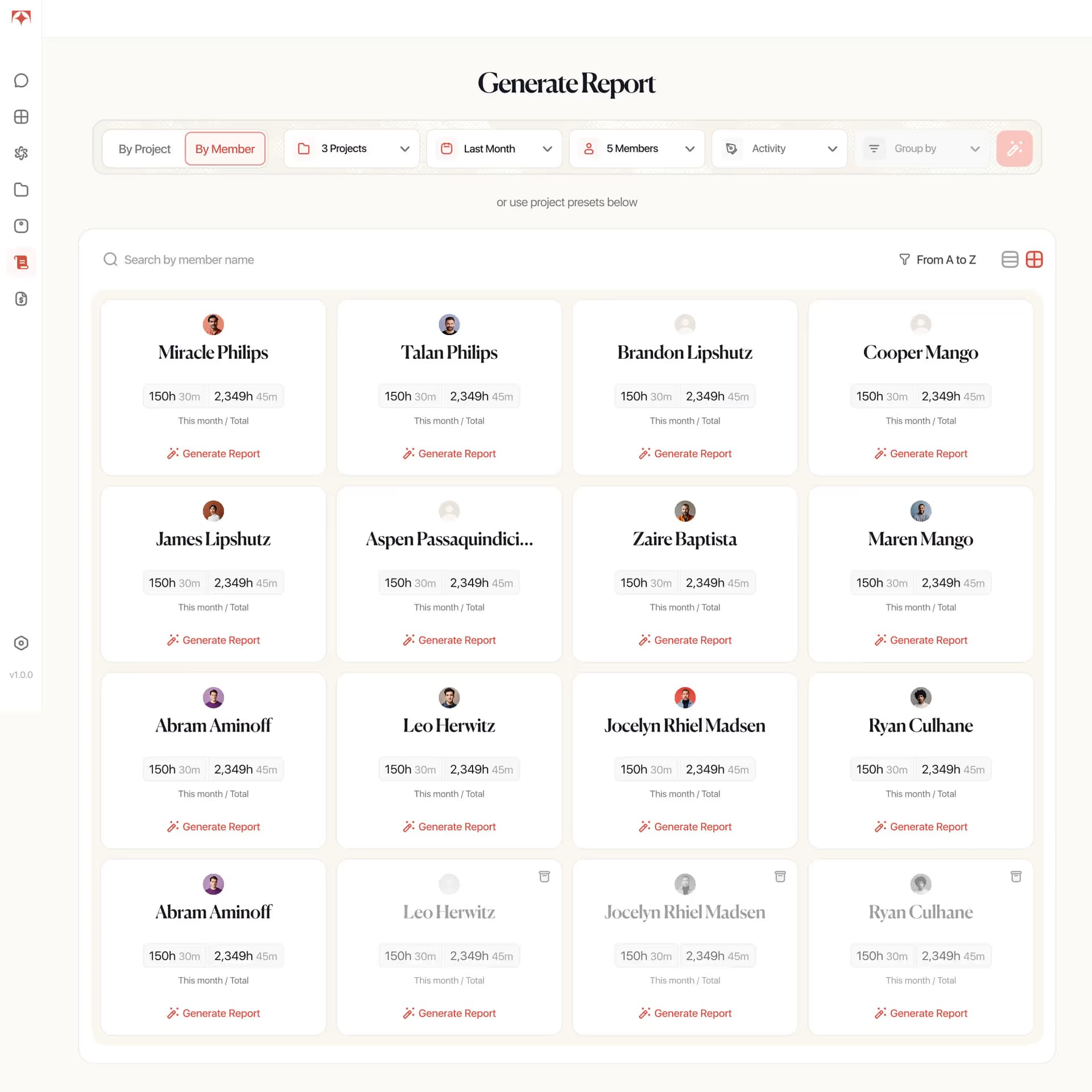
Tolmete Project Reports helps teams turn time logs into client-ready time tracking reports without manual spreadsheet work. Users can filter data by project, member, activity tag, and time period, review an AI-generated Project Overview, and export PDF/XLSX files for client updates.
The Problem
In many teams, project reporting still depends on manual log reviews, spreadsheet preparation, and repeated checks across members, activities, and time periods.
Raw time logs can show how many hours were tracked, but they rarely give managers or clients the full picture. They do not clearly show who contributed, what activities were performed, how time was distributed, or how the project progressed during a selected period.
Hours, members, and activity tags are hard to review together, so every project report takes longer to prepare.
Teams spend time filtering, checking, and formatting logs before the report is ready for client or internal review.
Clients need to see what was done, who contributed, and how the project progressed, not only how many hours were logged.
Tolmete Project Reports turns time-tracking data into structured, filterable, and export-ready time log reports, so teams can move from scattered logs to clear summaries faster.
Tolmete Project Reports helps teams turn time logs into client-ready time tracking reports without manual spreadsheet work. Users can filter data by project, member, activity tag, and time period, review an AI-generated Project Overview, and export PDF/XLSX files for client updates.
Tolmete removes the spreadsheet handoff with built-in project reports that work directly from filtered time logs. Teams can move from raw hours to an export-ready PDF or XLSX without rebuilding the same summary each cycle.
Filter, preview, and export — without spreadsheet work
How It Works
Project Reports connects tracked time with report generation. As project reporting software, it lets teams choose the right data, preview the report, and export files for clients or internal stakeholders
01/04
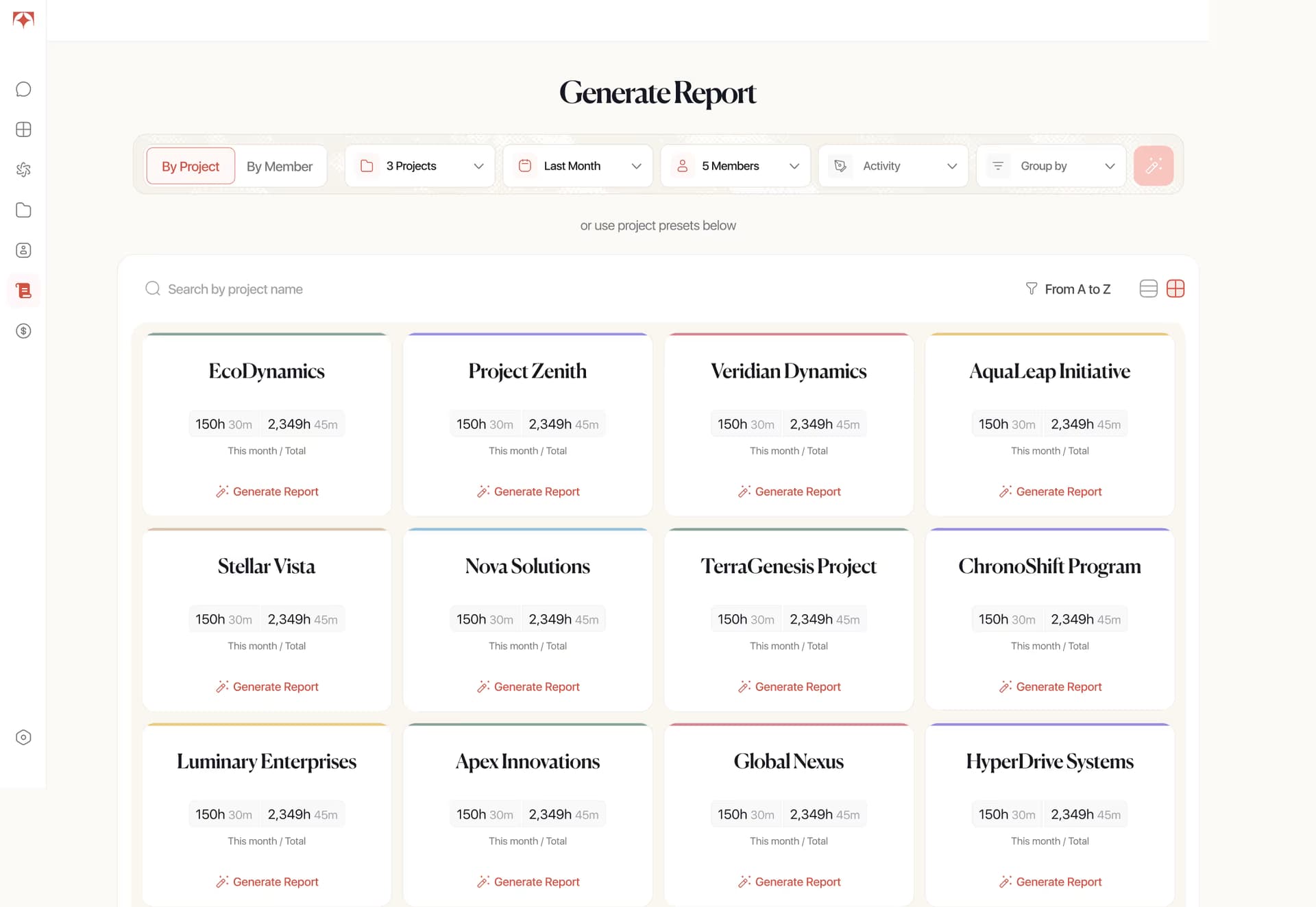
Users can start from the active projects list or configure filters manually by project, time range, members, and activity tags. Clicking a project preset opens a quick report with default filters already applied.
Key Capabilities
Project Reports gives teams the controls they need to create project time tracking reports with flexible filters, grouped data, AI-generated overviews, and export-ready files. Users can also prepare time log reports quickly when they need a focused view of tracked hours.
Filter reports by project, time range, members, and activity tags, so each report shows the exact data needed for review.
Start faster by selecting an active project and generating a quick report with default filters already applied.
Get a short summary of what the team worked on, where time was concentrated, and how the project progressed during the selected period.
Download reports as PDF/XLSX files or send them directly by email from Tolmete.
What Project Reports Make Possible
Each Project Report gives teams a structured view of project work for the selected period. Instead of showing only raw time logs, Tolmete combines total hours, activity-based reports, member contributions, and an AI-generated overview into one report that is easy to review, export, and share. Teams can also create project time reports with member and activity breakdowns for client updates or internal reviews.
Tolmete removes that handoff with a built-in invoice builder that work directly from project time logs. Teams can move from logged work to a client-ready report without exports or reformatting.
Fewer noisy alerts and clearer evidence. Every signal comes with an AI Wizard that explains what happened and suggests the next step.
Review a short summary of what the team worked on and how the project evolved during the selected period.
Create reports by member or activity to easily review contributions and see where work time went.
Clearer explanations when timelines change, backed by evidence instead of vague updates or reactive explanations.
Describe what you worked on in your own words, and Tolmete will turn it into clear, editable time logs with project, activity and context already organized
Why Tolmete is Different
Traditional client reporting depends on someone finding the time to build it. Tolmete replaces that cycle with a client reporting system that uses delivery evidence and automatically keeps clients informed.
Without Tolmete
With Tolmete
Traditional reports tell clients what happened after someone spends time building them. Tolmete gives clients a transparent, up-to-date reporting view when they need it.
Project Reports helps teams turn time logs into automated project reports for client updates, with flexible filters, AI-generated overviews, member and activity breakdowns, and PDF/XLSX export
FAQ
Everything you need to know about Tolmete.